
Setup
Everyone sees and does what is theirs to do.
The owner is never alone: deputy directors, site managers, custom roles and finely tuned privileges.
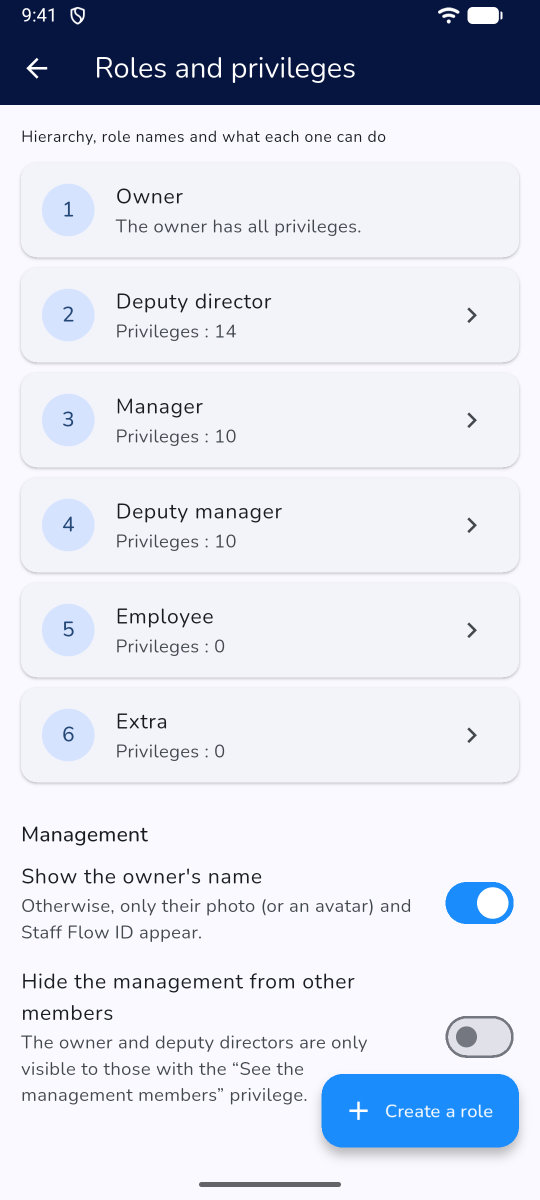
Custom roles
Rename existing roles or create new ones, and see at a glance who belongs to each.
- One person can be in several groups
- Add members by search or QR code
- Deputy directors
Privileges
Scheduling, leave, time clock, payroll, documents, subscription: each privilege is set per role, with exceptions per person.
- Exceptions for a specific person
- Subscription handed to an accountant
- API keys for those managing the subscription
Management discretion
Hide the management or the owner's name if you wish.
- Hide the owner's name
- Hide the management
- Avatars instead of Google photos, optional
Other features
Telegram botSchedule, reminders, leave, approvalsEveryday use
Time clock SF ProKiosks, QR code, badges, NFCEveryday use
Payroll and documents SF ProPayroll, document sending, e-signatureEveryday use
SchedulingBuild, publish, swapEveryday use
CommunicationAnnouncements, messaging, pollsEveryday use
Write API SF ProRights per key, MCP with write accessSetup
OrganisationSites, teams, rolesSetup
Legal rulesAlerts by countrySetup
AI assistantsChatGPT, Claude… with your rightsSetup
Read API, webhooks, MCPIncluded in the SF packSetup
Getting startedImport, sign-in, installationSetup
Your next schedule in 5 minutes
Try Staff Flow free for 2 days, with every feature, no card needed.